
Overview #
Network Share Report Providers are used in ReportWORQ to make existing folders and reports from the file system available for developing and executing ReportWORQ report distribution jobs. ReportWORQ allows developers to only select subfolders and files from any configured network or local locations.
If you want formulas in Excel source reports to be able to reference data from other Excel workbooks, place the source report and all referenced workbooks in the same folder, within the Network Share Provider. ReportWORQ cannot reference data from other workbooks via SharePoint URLs in the source report.
Configuration #
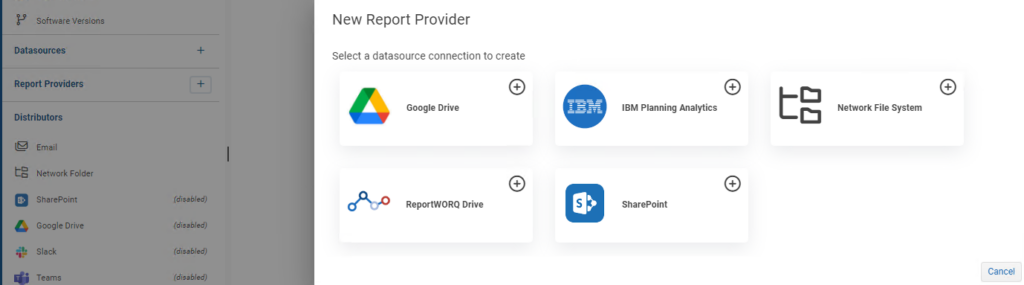
To add a Network Report Provider to the list of available providers, ReportWORQ administrators open the Administration screen then click the ‘+’ button beside Report Providers, and select the Network File System option:
The required configuration sidebar opens on the right-hand side of the page:
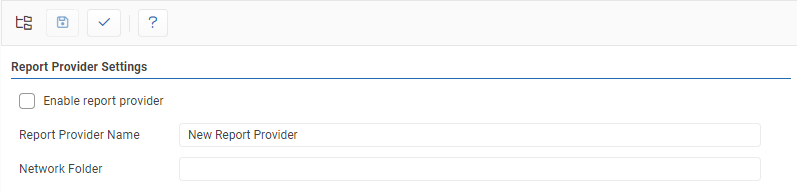
- Report Provider Name: This is a friendly name that describes the Report Provider, and will be visible to all users of the ReportWORQ application when browsing for source files. The name must be unique across all defined Report Providers.
- Network Folder: This defines the path to source files for the Report Provider and can be one of the following paths.
- Network Share folder path
- Local folder path
- Variable-driven folder path
- Test: Clicking the ‘✓’ button will either display a success message or show error messages with further information on missing or misconfigured settings.
- Save: the ‘Save’ button saves changes made to the provider.
- The Network Share Report Provider can be enabled or disabled by clicking the checkbox.

Network Share Folders #
Folders on the network cannot be referenced using drive letters since those would not be visible to ReportWORQ. Network share folders must instead be referenced using UNC Paths:
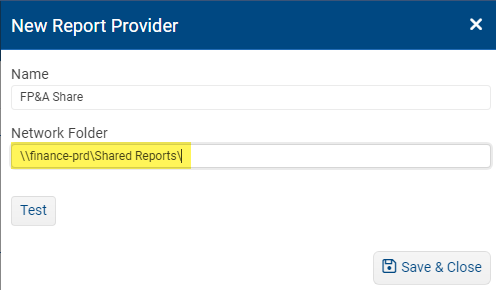
In this example, a “Shared Reports” network share located on the “finance-prd” server is being defined for use in ReportWORQ. ReportWORQ users will be able to browse files in this location, including subfolders, by selecting the “FP&A Share” Report Provider to add reports to a job.
Local Folders #
Folders on the local machine where ReportWORQ is installed can be specified using drive-letter paths:
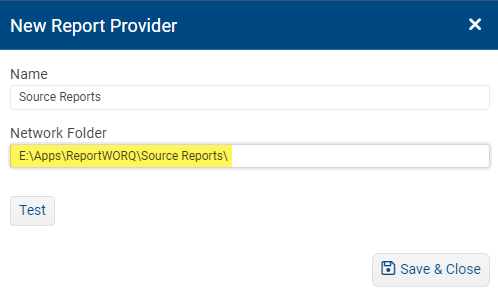
In this example, a Source Reports folder located on the local machine’s E: drive is being defined in ReportWORQ. ReportWORQ users will be able to browse folders and files in this location by selecting the “Source Reports” Report Provider to add reports to a job.
Variable-Derived Folders #
ReportWORQ supports several special system-defined variables. Network Share Report Providers can make use of the following variables in the Network Folder when specifying a local folder path:
| Variable | Description | Example |
| %RepoPath% | Used to refer to the configured ReportWORQ repository location | %RepoPath%..\Source Reports\ References a “Source Reports” folder that is a sibling to the ReportWORQ repository root folder. |


